

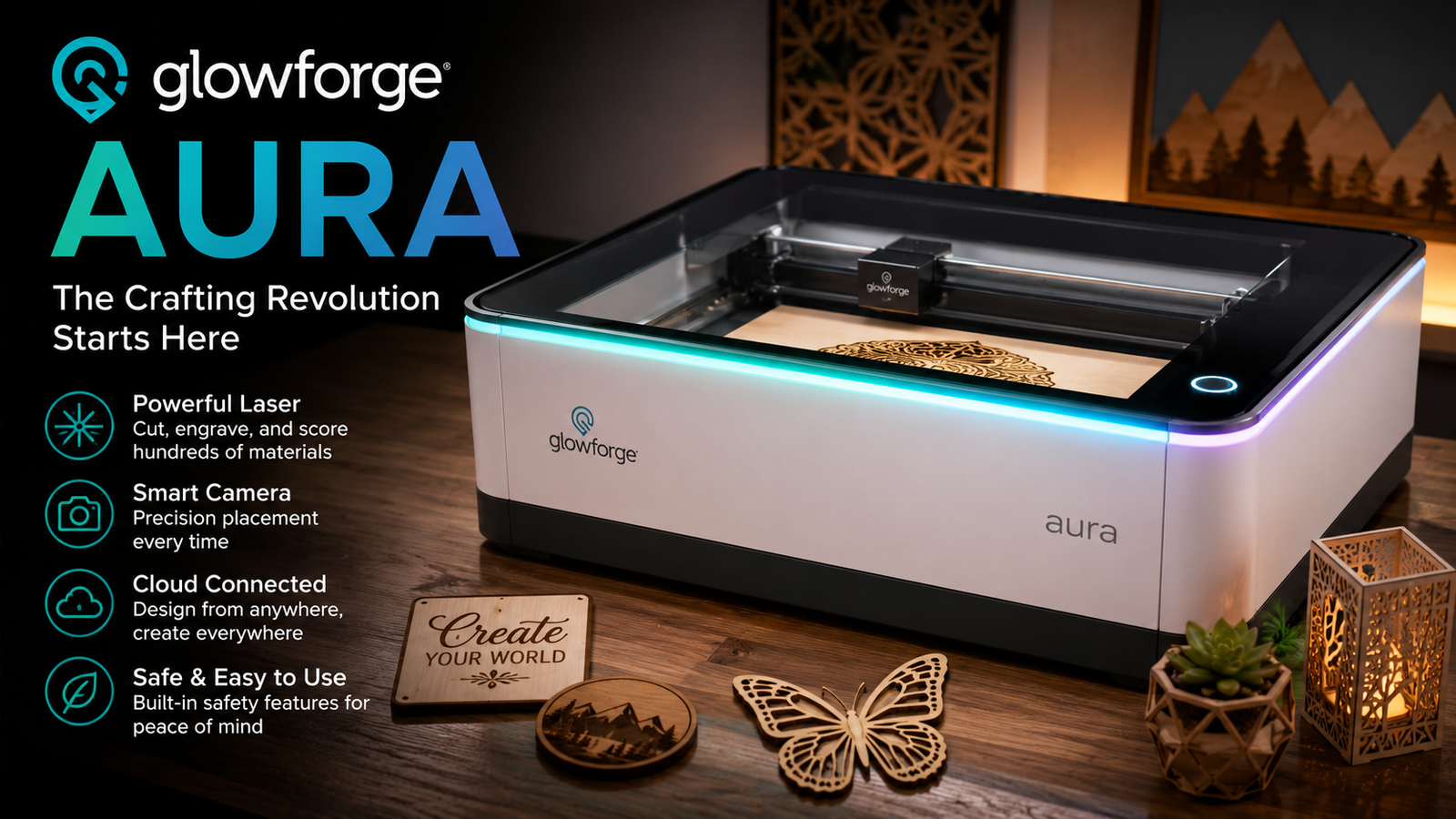
Glowforge Aura Review: Features, Pros, and Cons
The Glowforge Aura is designed to make laser crafting more accessible for hobbyists, small business owners, educators, and DIY enthusiasts. Unlike industrial laser cutters that require technical expertise and dedicated workshop space, the Aura focuses on simplicity without sacrificing creative potential.
Whether you’re making personalized gifts, custom home décor, classroom projects, or products for an online store, choosing the right laser cutter is an important investment. This review explores the Glowforge Aura in detail, covering its features, performance, supported materials, ease of use, advantages, limitations, and overall value.
By the end of this guide, you’ll have a clear understanding of whether the Glowforge Aura fits your needs and how it compares to other entry-level laser engravers.
Key Takeaways
- The Glowforge Aura is designed for beginners and creative hobbyists.
- Its user-friendly software makes laser crafting accessible without advanced technical skills.
- It excels at engraving and cutting many common craft materials.
- The compact design suits homes, classrooms, and small workshops.
- It offers convenience and ease of use but has limitations for professional production and certain materials.
Main Article
What Is the Glowforge Aura?
The Glowforge Aura is a compact desktop laser cutter and engraver built for creative projects. It uses a diode laser instead of the CO₂ laser found in larger Glowforge machines.
This distinction makes the Aura more affordable while still offering excellent performance for many everyday materials.
The machine is intended for users who want an easy setup, cloud-based software, and reliable results without spending time learning complex laser settings.
Typical users include:
- Hobby crafters
- Etsy sellers
- Teachers and schools
- Small business owners
- DIY enthusiasts
- Families interested in creative projects
Glowforge Aura Specifications
| Feature | Details |
|---|---|
| Laser Type | Diode Laser |
| Intended Users | Beginners and hobbyists |
| Software | Browser-based Glowforge App |
| Connection | Wi-Fi |
| Operation | Cloud-based |
| Safety Features | Enclosed design with built-in safety systems |
| Best Materials | Wood, acrylic (compatible types), leather, paper, cardboard, fabric and more |
Specifications may evolve over time as software updates and accessories become available.
Key Features of the Glowforge Aura
Beginner-Friendly Setup
One of the strongest selling points is the simple setup process.
After unpacking the machine, users can connect it to Wi-Fi, create an account, and begin making projects through the Glowforge interface with minimal configuration.
Unlike many laser engravers, there is very little technical setup involved.
Cloud-Based Software
The Glowforge Aura uses web-based software rather than requiring downloadable design programs.
Users can:
- Upload SVG files
- Import PNG images
- Add text
- Resize designs
- Position artwork
- Start jobs remotely through the browser
The interface is clean and intuitive, making it approachable for first-time users.
Compact Design
The Aura fits comfortably on most desks or workbenches.
Its compact footprint makes it suitable for:
- Home offices
- Craft rooms
- Classrooms
- Small studios
Users with limited workspace often appreciate this smaller form factor.
Built-In Camera
The integrated camera helps align artwork accurately on materials.
This feature reduces guesswork and makes it easier to position designs before engraving or cutting.
Automatic Material Detection
Compatible materials can often be recognized automatically.
The software recommends settings that reduce trial and error, making projects easier for beginners.
Materials the Glowforge Aura Can Handle
The Aura works well with many popular crafting materials.
Common compatible materials include:
- Basswood
- Plywood
- MDF designed for laser use
- Leather
- Cardboard
- Paper
- Chipboard
- Acrylic designed for diode lasers
- Fabric
- Cork
- Felt
Always verify material compatibility and follow manufacturer safety recommendations before use.
Materials to Avoid
Not every material is safe for laser cutting.
Users should avoid:
- PVC or vinyl
- Unknown plastics
- Polycarbonate
- Certain foams
- Hazardous composite materials
Some materials can release dangerous fumes when cut or engraved.
Performance Review
Cutting Performance
The Glowforge Aura performs well on thinner materials commonly used in crafting.
Examples include:
- Wooden ornaments
- Greeting cards
- Personalized signs
- Gift tags
- Decorative boxes
- Jewelry pieces
Thicker materials may require multiple passes or may not be suitable depending on the material type.
Engraving Quality
Engraving quality is one of the Aura’s strongest areas.
It produces:
- Sharp text
- Detailed graphics
- Fine line artwork
- Decorative patterns
- Personalized names and logos
Proper material selection greatly influences final results.
Speed
The Aura prioritizes ease of use over industrial production speed.
For hobby projects and small product batches, performance is generally more than adequate.
Businesses producing large daily volumes may require faster equipment.
Ease of Use
Ease of use is where the Glowforge Aura truly stands out.
New users often appreciate:
- Guided setup
- Clear project workflow
- Automatic recommendations
- Minimal manual adjustments
- Friendly software interface
Most beginners can complete their first project shortly after setup.
Software Experience
The Glowforge ecosystem is designed around simplicity.
The software includes useful features such as:
- Drag-and-drop editing
- Basic text tools
- Project preview
- Material settings
- Design positioning
- Job management
More advanced users can create artwork in external design software before importing files.
Project Ideas
The Glowforge Aura supports a wide variety of creative projects.
Popular ideas include:
- Personalized coasters
- Wedding decorations
- Holiday ornaments
- Teacher gifts
- Business signage
- Keychains
- Leather wallets
- Wooden puzzles
- Home décor
- Cake toppers
- Bookmarks
- Earrings
- Customized notebooks
- Educational materials
Many small businesses use machines like the Aura to create personalized products for online marketplaces.
Glowforge Aura Pros
The Glowforge Aura offers several significant advantages.
Easy for Beginners
Its intuitive software reduces the learning curve considerably.
Excellent Build Quality
The enclosed machine feels polished and well designed.
High-Quality Engraving
Fine details are reproduced cleanly on compatible materials.
Compact Size
The Aura fits into spaces where larger laser cutters may not.
Strong Community
Glowforge users benefit from an active community that shares tutorials, project ideas, and design inspiration.
Glowforge Aura Cons
Despite its strengths, the Aura has limitations.
Diode Laser Limitations
A diode laser cannot perform every task that a more powerful CO₂ laser can.
Material Restrictions
Some materials either cannot be processed or require special consideration.
Cloud-Based Workflow
Internet connectivity is generally required to access the Glowforge software, which may not suit users seeking a fully offline workflow.
Better for Hobby Use
Heavy commercial production environments may outgrow the Aura relatively quickly.
Glowforge Aura vs Glowforge Plus
| Feature | Glowforge Aura | Glowforge Plus |
|---|---|---|
| Laser Type | Diode | CO₂ |
| Target User | Beginners | Advanced hobbyists and businesses |
| Price | Lower | Higher |
| Material Capability | Good | Broader |
| Power | Moderate | Higher |
| Production Capacity | Light to Moderate | Moderate to Heavy |
For occasional crafting and creative hobbies, the Aura offers excellent value. Users with higher production demands or broader material needs may prefer the Glowforge Plus.
Who Should Buy the Glowforge Aura?
The Glowforge Aura is an excellent choice for:
- First-time laser users
- Hobby crafters
- Etsy shop owners
- Teachers
- Families
- DIY creators
- Gift makers
- Home-based businesses
It may not be ideal for:
- Industrial manufacturing
- Large-scale production
- Users who frequently cut thick materials
- Workshops requiring maximum cutting power
Is the Glowforge Aura Worth the Price?
Value depends on your goals.
If you want a reliable, beginner-friendly machine with polished software and excellent engraving quality, the Aura offers a compelling package.
Its ease of use reduces frustration for new users, while the compact design makes it practical for home use.
Those focused on professional production or demanding materials may find that investing in a more powerful CO₂ laser provides greater long-term flexibility.
Overall, the Glowforge Aura strikes a strong balance between affordability, usability, and creative capability.
Frequently Asked Questions
Is the Glowforge Aura good for beginners?
Yes. It is specifically designed for beginners with an intuitive setup process, guided software, and minimal manual configuration.
Can the Glowforge Aura cut acrylic?
Yes, it can cut certain acrylic materials that are compatible with diode lasers. Material compatibility should always be verified before use.
Does the Glowforge Aura require internet access?
The Glowforge workflow is cloud-based, so internet access is generally required to use its software and manage projects.
What file types does the Glowforge Aura support?
Common supported file formats include SVG, PNG, JPG, and PDF for many design workflows.
Can I start a small business with the Glowforge Aura?
Yes. Many makers use it to create personalized products, gifts, home décor, and craft items for small online businesses. Production volume, however, is best suited to small-scale operations.
What materials should never be used?
Avoid PVC, vinyl, unknown plastics, polycarbonate, and other materials that can release hazardous fumes during laser processing.
Conclusion
The Glowforge Aura succeeds in making laser crafting approachable for a wide audience. Its combination of straightforward setup, cloud-based software, compact design, and high-quality engraving makes it an attractive option for beginners and hobbyists alike.
While it cannot match the versatility and power of larger CO₂ laser machines, it delivers dependable performance for a broad range of creative projects. Whether you’re creating personalized gifts, educational materials, home décor, or products for a small business, the Glowforge Aura provides an enjoyable and accessible entry into laser crafting.
For users who value simplicity, reliable results, and a polished user experience over industrial-grade capabilities, the Glowforge Aura remains one of the strongest desktop laser cutters in its class.















Leave a Reply