

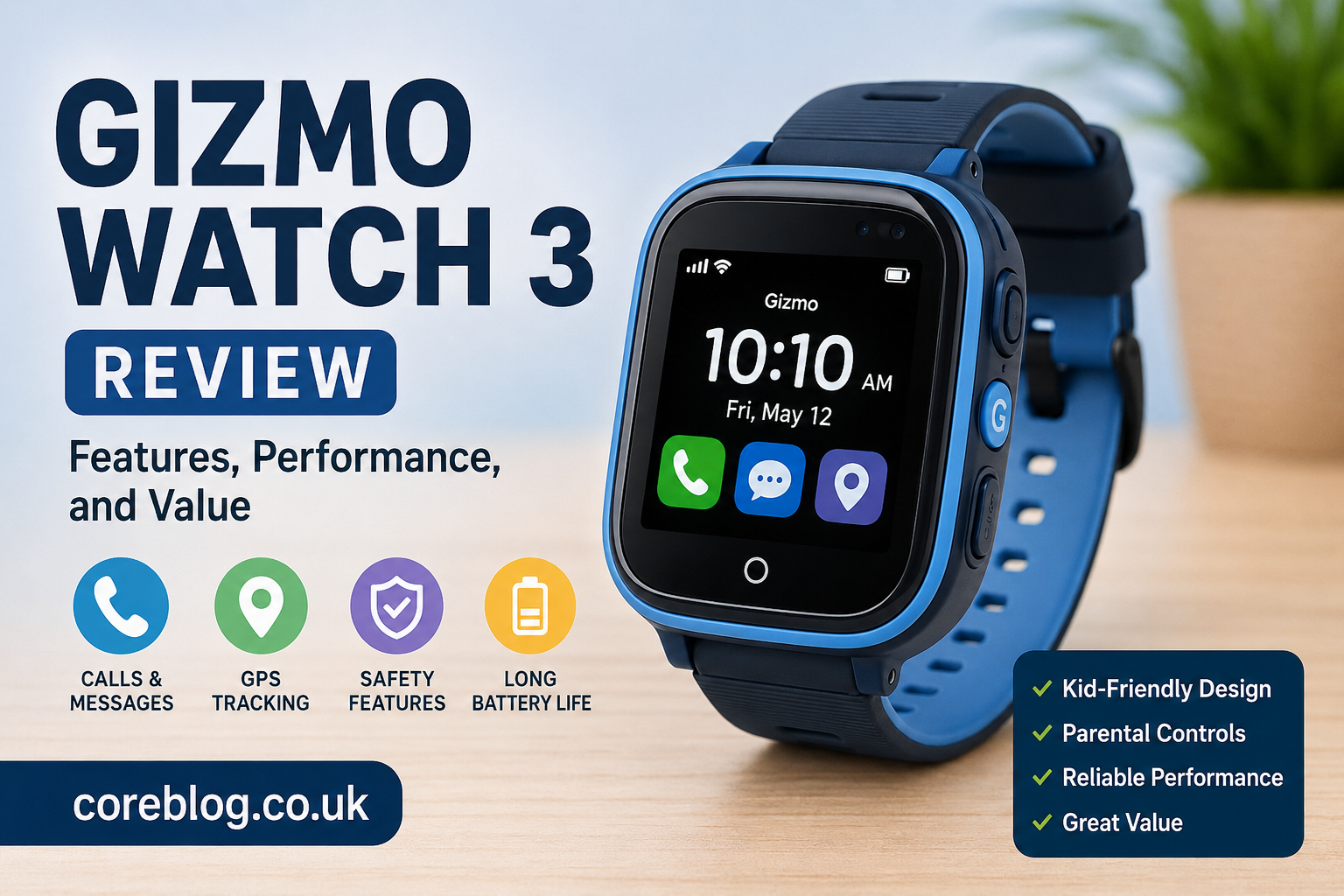
Gizmo Watch 3 Review: Features, Performance, and Value
If you’re looking for a smartwatch designed specifically for children, you’ve probably come across the Gizmo Watch 3. Built with family communication and child safety in mind, this wearable combines calling, messaging, GPS tracking, and parental controls in a kid-friendly design.
This Gizmo Watch 3 Review explores everything you need to know before purchasing one. We’ll examine its design, setup process, features, performance, battery life, safety tools, and overall value. Whether you’re buying your child’s first smartwatch or upgrading from an earlier model, this guide will help you decide if the Gizmo Watch 3 meets your family’s needs.
Key Takeaways
- The Gizmo Watch 3 focuses on safe communication between children and parents.
- GPS tracking and parental controls are among its strongest features.
- The watch is simple for children to use thanks to its intuitive interface.
- Battery life is suitable for daily use but depends on usage patterns.
- It offers excellent value for families seeking a child-friendly smartwatch rather than a full-featured smartwatch.
Main Article
What Is the Gizmo Watch 3?
The Gizmo Watch 3 is a smartwatch created specifically for children. Unlike traditional smartwatches that focus on productivity or fitness, this device emphasizes communication, location tracking, and child safety.
Parents can stay connected with their children through voice calls, text messaging, and location sharing while maintaining control over who can contact the watch.
Its purpose is simple: give children greater independence while helping parents stay informed and connected.
Who Is the Gizmo Watch 3 For?
The Gizmo Watch 3 is best suited for:
- Children receiving their first connected device
- Parents who want GPS location tracking
- Families wanting communication without giving a child a smartphone
- Kids who walk to school or participate in after-school activities
- Parents looking for customizable safety settings
It is less suitable for teenagers who may prefer a standard smartwatch with broader app support.
Design and Build Quality
The first thing you’ll notice is that the Gizmo Watch 3 has a colorful, child-friendly appearance.
Display
The touchscreen is bright enough for outdoor visibility and large enough for children to navigate comfortably.
Comfort
The lightweight design makes it comfortable for all-day wear.
The adjustable strap fits a variety of wrist sizes, making it suitable for younger children as they grow.
Durability
Because children’s devices often experience rough handling, durability matters.
The watch is designed to withstand everyday bumps and splashes, although it should not be treated as a rugged adventure watch.
Setup Process
One of the strengths highlighted in this Gizmo Watch 3 Review is the simple setup experience.
The process generally involves:
- Charging the watch.
- Installing the companion app.
- Activating the device.
- Pairing the watch with a parent’s account.
- Adding approved contacts.
- Configuring safety settings.
Most parents can complete the setup in under 30 minutes.
Communication Features
Communication is one of the biggest reasons families choose the Gizmo Watch 3.
Voice Calling
Parents can create an approved contact list.
Only authorized contacts are able to call the watch, providing additional security.
Call quality is generally clear when network coverage is strong.
Messaging
Children can send and receive messages with approved contacts.
This allows quick communication without exposing children to unrestricted messaging platforms.
Video Calling
Depending on carrier support and configuration, some versions include video calling capabilities that add another level of communication between parents and children.
GPS Tracking and Location Services
One of the most valuable features is built-in GPS tracking.
Parents can:
- View the child’s current location
- Check location history
- Receive arrival notifications
- Monitor departures from saved locations
This provides reassurance without requiring constant phone calls.
Location Accuracy
Location accuracy is generally reliable outdoors.
Like most GPS devices, accuracy may decrease indoors or in densely built urban environments.
Safety Features
The Gizmo Watch 3 places child safety at the center of its design.
Important safety tools include:
- Emergency contact options
- GPS tracking
- Safe zones
- Approved contact lists
- Location alerts
- Parent-managed settings
These features help parents maintain oversight while allowing children greater independence.
Parental Controls
The companion app gives parents extensive control over the device.
Parents can:
- Add or remove contacts
- Adjust permissions
- Monitor location
- Manage communication settings
- Schedule quiet hours
- Customize safety notifications
The controls are straightforward and easy to navigate.
Battery Life
Battery performance depends heavily on usage.
Activities that consume more power include:
- GPS tracking
- Frequent calls
- Video calling
- Bright screen settings
- Continuous notifications
For many families, the battery comfortably lasts through a typical school day before requiring overnight charging.
Charging is simple and generally completes within a reasonable amount of time.
Performance and User Experience
The Gizmo Watch 3 is designed with simplicity in mind.
Menus are clear.
Icons are large.
Navigation is intuitive.
Children can quickly learn how to:
- Make calls
- Send messages
- View contacts
- Check the time
- Access basic features
The interface avoids unnecessary complexity, which is a significant advantage for younger users.
Health and Activity Features
Although safety is the primary focus, the watch also encourages healthy habits.
Depending on the version, features may include:
- Step counting
- Activity goals
- Movement reminders
- Basic fitness tracking
These features are intended to motivate children rather than replace dedicated fitness watches.
Everyday Performance
During everyday use, the watch performs reliably for its intended audience.
Parents generally appreciate:
- Fast communication
- Easy location tracking
- Simple management
- Child-friendly interface
Children often enjoy:
- Personalizing the watch
- Easy navigation
- Quick access to approved contacts
- Wearing a device that feels modern without being overwhelming
Pros and Cons
| Pros | Cons |
|---|---|
| Excellent parental controls | Limited third-party apps |
| Reliable GPS tracking | Battery varies with heavy use |
| Easy setup | Not designed for older teens |
| Kid-friendly interface | Some advanced smartwatch features are absent |
| Safe communication tools | Requires compatible service |
Gizmo Watch 3 vs a Traditional Smartwatch
| Feature | Gizmo Watch 3 | Traditional Smartwatch |
|---|---|---|
| Child Safety | Excellent | Limited |
| Parent Controls | Extensive | Minimal |
| GPS Tracking | Yes | Often available |
| App Store | Limited | Extensive |
| Child-Friendly Design | Yes | Usually No |
| Communication Controls | Parent Managed | User Managed |
This comparison shows why the Gizmo Watch 3 appeals specifically to families with younger children rather than general smartwatch users.
Is the Gizmo Watch 3 Worth Buying?
The answer depends on your priorities.
If you’re looking for:
- A child’s first connected device
- Reliable communication
- GPS tracking
- Strong parental controls
- A safer alternative to a smartphone
then the Gizmo Watch 3 is an appealing option.
However, if your child wants advanced apps, music streaming, or a broader smartwatch experience, a traditional smartwatch may better suit their needs.
Ultimately, the Gizmo Watch 3 succeeds because it focuses on doing a few essential things well rather than trying to replace a smartphone.
Frequently Asked Questions
Is the Gizmo Watch 3 suitable for young children?
Yes. It is designed primarily for children and features a simple interface with strong parental controls.
Can parents track the Gizmo Watch 3 location?
Yes. Parents can view the watch’s location through the companion app and configure location alerts and safe zones.
Does the Gizmo Watch 3 support phone calls?
Yes. Children can make and receive calls with approved contacts selected by parents.
How long does the battery last?
Battery life varies depending on GPS use, calling, messaging, and screen activity, but it is generally intended to last through a typical day.
Does the Gizmo Watch 3 require a smartphone?
Children do not need their own smartphone to use the watch, but parents typically need a compatible smartphone to manage settings through the companion app.
Is the Gizmo Watch 3 waterproof?
The watch is designed to handle everyday splashes and light exposure to water, but users should always follow the manufacturer’s water-resistance guidelines and avoid activities beyond its rated protection.
Can children install apps on the Gizmo Watch 3?
The device is intentionally limited compared with traditional smartwatches. This helps maintain a safer and more controlled experience for children.
Conclusion
The Gizmo Watch 3 Review shows that this smartwatch is built with families in mind. Rather than competing with full-featured smartwatches, it focuses on the essentials that matter most to parents: safe communication, dependable location tracking, straightforward parental controls, and an interface children can use with confidence.
Its combination of calling, messaging, GPS features, and easy management makes it an excellent option for younger children who are not yet ready for a smartphone. While it lacks the expansive app ecosystem and advanced features found on standard smartwatches, those limitations are intentional and align with its purpose.
For parents seeking a practical, secure, and easy-to-manage wearable that helps children stay connected while encouraging independence, the Gizmo Watch 3 delivers strong overall value and remains a worthwhile choice.












Leave a Reply