

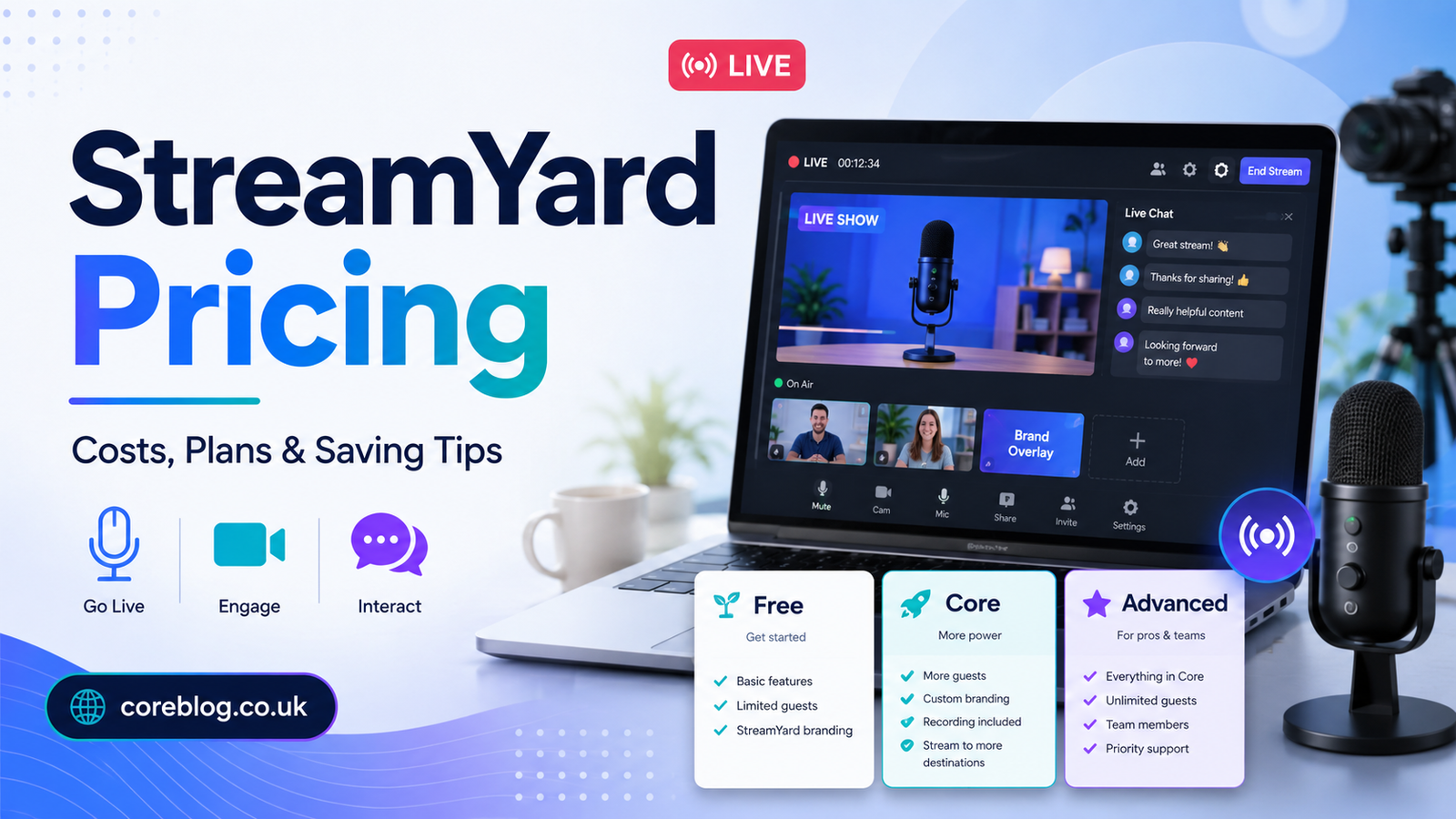
StreamYard Pricing: Plans, Costs, and Best Value
Why StreamYard Pricing Matters More Than You Think
Picking a live streaming tool sounds simple at first. You want to go live, invite a guest, stream to YouTube or Facebook, maybe record the show, and look professional while doing it. Easy enough, right?
Then you open the pricing page.
Suddenly, you are looking at plans, storage limits, recording options, guest seats, video quality, branding tools, multistreaming destinations, local recordings, webinars, and business features. That is where many creators pause and ask the real question: Is StreamYard worth the money?
The honest answer is: it depends on how you use it.
StreamYard is one of the most popular browser-based live streaming platforms for creators, podcasters, coaches, marketers, educators, and businesses. It helps you stream live without complicated software, heavy downloads, or a full production team. You can invite guests with a link, show comments on screen, add your brand elements, and record your content for later use.
But not every user needs the most expensive plan. Some people can start with the free version. Others will get better value from a paid plan because they need clean branding, better quality, more destinations, or stronger recording tools.
So, let’s break down StreamYard pricing in a clear and practical way. No confusing talk. No hard-selling. Just a helpful guide that explains the plans, costs, features, pros, cons, and smart saving tips.
What Is StreamYard?
StreamYard is a live streaming and recording studio that works inside your browser. You do not need to install large software or understand complex encoder settings. You simply log in, create a broadcast, invite guests, connect your channels, and go live.
That simple setup is one of the biggest reasons people choose StreamYard. It is built for users who want good-looking live content without dealing with technical stress.
You can use StreamYard for:
- YouTube live streams
- Facebook live shows
- LinkedIn broadcasts
- Podcast interviews
- Webinars
- Online classes
- Coaching sessions
- Virtual events
- Product launches
- Panel discussions
- Business Q&A sessions
- Community updates
- Training videos
In short, StreamYard helps you create live video content that looks more polished than a basic webcam call.
StreamYard Pricing Overview
The official StreamYard pricing page currently lists a Free plan, a Core plan, and an Advanced plan for individuals. The Free plan costs $0. The Core plan is listed at $44.99 per month when billed monthly or $35.99 per month when billed yearly. The Advanced plan is listed at $88.99 per month when billed monthly or $68.99 per month when billed yearly. StreamYard also says prices may vary because of promotions, seasonal offers, renewal terms, and custom deals.
Here is a simple comparison:
| StreamYard Plan | Best For | Monthly Price | Annual Billing Price | Main Value |
|---|---|---|---|---|
| Free | Beginners and testing | $0 | $0 | Basic streaming with StreamYard branding |
| Core | Serious creators | $44.99/month | $35.99/month | Full HD, branding tools, more control |
| Advanced | Professionals | $88.99/month | $68.99/month | More destinations, webinars, transcripts |
| Business | Teams and companies | Varies | Varies | Team features and higher-level workflows |
Pricing can change over time, so it is always smart to check the latest details before subscribing. However, this structure gives a clear picture of how StreamYard separates casual users, serious creators, and professional teams.
StreamYard Free Plan: A Good Place to Start
The StreamYard Free plan is useful if you are new to live streaming. It gives you a chance to test the platform without spending money.
You can learn the dashboard, invite a guest, test your microphone, check your camera, and understand how the live studio works. That alone makes it valuable for beginners.
What You Usually Get With the Free Plan
The Free plan includes essential studio features, but it also comes with limits. According to StreamYard’s current pricing details, the Free plan includes StreamYard branding, streaming limits, limited storage, 2 hours per month of local recordings, 6 on-screen participants, and 1 seat.
This is enough for casual users, small tests, and first-time live shows.
Who Should Use the Free Plan?
The Free plan is a smart choice if you:
- Are testing StreamYard for the first time
- Do not stream often
- Do not mind StreamYard branding
- Want to practice before going professional
- Are still building your content idea
- Need a basic live streaming tool without cost
For example, if you want to run a simple YouTube live session once a month, the Free plan may be enough. However, if your stream represents your business or personal brand, the visible branding can make your show look less polished.
StreamYard Core Plan: The Best Choice for Many Creators
The Core plan is where StreamYard starts to feel like a real professional tool. It removes the biggest free-plan limits and gives creators more control over how their live content looks.
This plan is often the best value for solo creators, podcasters, coaches, consultants, educators, and small business owners.
What Makes the Core Plan Useful?
The Core plan includes Full HD 1080p, no StreamYard logo on streams, multistreaming to 3 destinations, custom branding tools, 10 on-screen participants, unlimited streaming and recording, custom RTMP destinations, 50 hours of permanent storage, AI clips, cloud recording, chat overlay, clean thumbnails with no watermark, and more.
That is a big jump from the Free plan.
With Core, you can create a more branded and professional show. You can add your logo, overlays, video clips, backgrounds, intro videos, outro videos, and custom layouts.
Why Branding Matters
Branding may sound like a small detail, but it matters a lot. When viewers see your logo, colors, overlays, and clean visuals, your show feels more trustworthy.
A simple live stream can become a branded video experience. That matters if you are using StreamYard for:
- Client-facing webinars
- Coaching programs
- Interview shows
- Online courses
- YouTube channels
- Business livestreams
- Product demos
- Professional podcasts
If you care about first impressions, the Core plan is where StreamYard starts to shine.
StreamYard Advanced Plan: Built for Bigger Needs
The Advanced plan is for users who want more power, more flexibility, and more professional features. It is not necessary for everyone, but it can be very useful if live video is part of your business strategy.
What Does Advanced Add?
The Advanced plan includes everything in Core, plus 4K local recordings, multistreaming to 8 destinations, extra camera support, 15 backstage participants, 4 hours of pre-recorded streams, On-Air webinars, custom fonts, and downloadable transcripts.
These features are useful for creators and businesses that produce content often and need more control.
Who Should Choose Advanced?
Advanced may be the right StreamYard plan if you:
- Stream to many platforms at once
- Host professional webinars
- Need transcripts for blog posts or captions
- Record interviews for repurposing
- Work with larger guest groups
- Want stronger production flexibility
- Run live events for clients or customers
- Need better tools for content marketing
For example, a coach who hosts weekly webinars and turns them into YouTube videos, email content, short clips, and blog articles may get strong value from Advanced.
StreamYard Business Plans: For Teams and Organizations
The individual plans are good for solo users, but larger teams may need more. That is where business plans come in.
A business plan can be useful for agencies, marketing departments, event companies, schools, media brands, and corporate teams. These users often need more seats, more control, stronger support, team workflows, and higher production limits.
When a Business Plan Makes Sense
A business plan may be worth considering if:
- Multiple people manage broadcasts
- Your company hosts frequent webinars
- You need team access
- You run client livestreams
- You need higher storage or viewer limits
- Live video is part of your sales or marketing funnel
- You need professional support
Most solo creators do not need a business plan. However, for organizations, it can save time and make production smoother.
StreamYard Free vs Paid Plans
A free plan always sounds attractive. And honestly, the StreamYard Free plan is helpful. But free is not always the best choice when you want professional results.
Here is a quick look:
| Feature | Free Plan | Paid Plans |
|---|---|---|
| Cost | $0 | Monthly or yearly fee |
| Branding | StreamYard logo included | Remove StreamYard logo |
| Video Quality | More limited | Full HD on Core |
| Multistreaming | Limited | More destinations |
| Recording | Limited | More recording options |
| Storage | Limited | More storage |
| Best For | Testing and casual use | Creators, brands, businesses |
The Free plan helps you start. The paid plans help you look professional.
Is StreamYard Expensive?
Some users may feel StreamYard is expensive compared to free tools like OBS. That reaction is understandable. OBS is powerful and free, while StreamYard charges for convenience and ease.
However, price is not only about the monthly fee. You should also think about time, stress, setup, guest experience, and content quality.
OBS may be better for advanced technical users. But for interviews, webinars, guest shows, and business streams, StreamYard is often easier.
The Hidden Cost of Free Tools
A free tool can still cost you time.
You may spend hours learning settings, fixing audio, managing scenes, connecting stream keys, testing plugins, or helping guests join correctly. If you enjoy technical setup, that may be fine. But if you want to focus on content, StreamYard can save time.
That is the real value. You are not only paying for software. You are paying for a smoother workflow.
Best Value Plan: Which StreamYard Plan Should You Choose?
For most serious creators, the Core plan offers the best balance of cost and features.
It removes the StreamYard logo, unlocks Full HD, gives you branding tools, allows multistreaming to 3 destinations, and supports a more professional setup. That makes it a strong choice for people who stream regularly but do not need every advanced feature.
Choose Free If
Pick the Free plan if you are:
- New to live streaming
- Testing StreamYard
- Streaming casually
- Not worried about branding
- Not ready to invest yet
Choose Core If
Pick Core if you:
- Want a professional-looking stream
- Need Full HD video
- Want to remove StreamYard branding
- Stream to multiple platforms
- Run interviews or podcasts
- Create content regularly
Choose Advanced If
Pick Advanced if you:
- Need more streaming destinations
- Host webinars
- Want transcripts
- Need 4K local recordings
- Work with larger shows
- Use live video for business growth
Choose Business If
Pick Business if you:
- Work with a team
- Need advanced admin controls
- Run client events
- Need higher limits
- Use live streaming at company level
Smart Tips to Save Money on StreamYard
The best plan is not always the most expensive one. You can save money by choosing carefully.
Start With the Free Plan
Before paying, test the Free plan. Run a private stream. Invite a friend. Try the studio. Test your camera and audio. This helps you decide whether StreamYard fits your workflow.
Pay Yearly Only When You Are Sure
Annual billing usually lowers the monthly cost. For example, Core and Advanced are cheaper per month when billed yearly on the current official pricing page.
However, do not rush into annual billing if you are still testing. Use the platform first, then commit when you know it works for you.
Do Not Overbuy Features
Many users pay for features they do not use. If you only stream to YouTube and Facebook, you may not need a higher plan with more destinations.
Choose the plan that fits your actual content routine.
Repurpose Every Stream
This is one of the best ways to get more value from StreamYard. Do not let a live stream disappear after it ends.
Turn one stream into:
- A YouTube video
- A podcast episode
- Short clips
- Blog content
- Email newsletter content
- Social media posts
- Training material
- Lead magnet content
When you reuse your recordings, your subscription becomes much more valuable.
Review Your Plan Every Few Months
Your needs may change. Maybe you started with Advanced but only use Core features. Or maybe your show grew and you now need more destinations.
Review your StreamYard plan every few months so you are not overpaying.
Key Features That Affect StreamYard Value
Video Quality
Video quality is important if you want your content to look professional. Core includes Full HD 1080p streaming, while Advanced adds 4K local recording. For interviews, coaching, and business streams, better quality can improve the viewer experience.
Multistreaming
Multistreaming lets you go live on more than one platform at once. This helps you reach viewers across YouTube, Facebook, LinkedIn, and other channels.
If your audience is spread across platforms, this feature can be very valuable.
Guest Invitations
Guest access is one of the best parts of StreamYard. You can invite someone with a simple link. They do not need to install software. This makes interviews and panel shows much easier.
Branding Tools
Branding tools help your stream look like your own show instead of a generic video call. Logos, overlays, backgrounds, and video clips can make a big difference.
Recording and Storage
Recording is essential if you want to reuse content. Many creators use StreamYard to record podcasts, interviews, and webinars. Later, they edit those recordings into clips, articles, or full video episodes.
Webinars
Webinar features are useful for educators, marketers, coaches, and businesses. If you sell services, teach online, or host lead-generation events, the Advanced plan may be worth considering.
Pros and Cons of StreamYard Pricing
Pros
- Free plan available
- Easy to use
- No software download needed
- Good for beginners
- Simple guest invitations
- Professional branding on paid plans
- Full HD available on Core
- Useful recording tools
- Multistreaming support
- Good for podcasts and webinars
- Saves setup time
Cons
- Free plan includes StreamYard branding
- Paid plans may feel costly for casual users
- Some strong features require Advanced
- Pricing may change over time
- Not ideal for users who want deep technical scene control
Is StreamYard Good for Beginners?
Yes, StreamYard is very beginner-friendly. The dashboard is clean, and most features are easy to understand. You can create a broadcast, invite guests, add basic visuals, and go live without needing a technical background.
That makes it a strong choice for new creators who want to avoid the stress of complex streaming software.
However, beginners should start slowly. Use the Free plan first. Learn the basics. Then upgrade when your content becomes more serious.
Is StreamYard Good for Businesses?
Yes, StreamYard can be useful for businesses that use live video for marketing, education, customer engagement, or sales.
Businesses can use it for:
- Product demos
- Live Q&A sessions
- Internal training
- Public webinars
- Expert interviews
- Customer education
- Brand announcements
- Virtual events
For small businesses, Core may be enough. For larger teams, Advanced or Business plans may offer better value.
Is StreamYard Worth It?
StreamYard is worth it if live video is part of your content or business strategy. It saves time, keeps the process simple, and helps you create polished live streams without needing a full production setup.
It may not be worth paying for if you only stream once in a while. In that case, the Free plan may be enough.
But if you stream weekly, host interviews, run webinars, or build a personal brand, a paid StreamYard plan can be a smart investment.
Common Mistakes to Avoid Before Buying StreamYard
Buying the Biggest Plan Too Early
Do not pay for Advanced just because it has more features. Start with what you need now.
Ignoring Branding
If your live stream represents a brand, do not ignore branding. A clean logo, overlay, and professional layout can make your content feel more trustworthy.
Forgetting About Repurposing
If you only go live and never reuse the recording, you leave value on the table. Repurpose your streams to get more from your plan.
Not Testing Before Paying
Always test the platform first. Make sure your camera, microphone, guests, and streaming destinations work well.
Final Recommendation: Best StreamYard Plan for Most Users
For most creators, the Core plan is the best value. It gives you professional features without jumping to the highest price. You get clean branding, Full HD, multistreaming, recording tools, and more control over your live content.
The Free plan is best for testing. Advanced is best for professionals who need webinars, transcripts, more destinations, and stronger production features. Business plans are best for teams and organizations.
Conclusion: StreamYard Pricing Comes Down to Real Value
StreamYard pricing is not just about dollars per month. It is about what the platform helps you do.
If it saves you time, improves your brand image, makes guest interviews easier, helps you reach more platforms, and gives you reusable recordings, then the cost can be worth it.
Start with the Free plan if you are unsure. Move to Core when you want a more professional look. Choose Advanced when your live streaming workflow becomes more serious. And if you run a team or company, explore business-level options.
The smartest choice is the plan that matches your real goals, not the one with the longest feature list.
If this guide helped you understand StreamYard pricing, share it with another creator, podcaster, coach, or business owner who is trying to choose the right live streaming tool.









Leave a Reply